Tel./WhatsApp:
+86 15266206885
E-mail:
[email protected]


Evita che la tua richiesta sia una risposta tardiva, inserisci il tuo WhatsApp/Skype insieme al messaggio, in modo da poterti contattare al primo colpo.
Vi risponderemo entro 24 ore. Se per il caso urgente, si prega di aggiungere WhatsApp/WeChat: ,. O chiamare direttamente.
Quando le etichette si sbavano, si staccano o si scansionano male, l'intera linea rallenta. I resi aumentano. I lavoratori ristampano sempre le stesse cose. Un "piccolo" problema di etichette si trasforma rapidamente in un grosso problema di produttività. La soluzione è semplice: scegliete l'etichettatrice o la stampante di etichette più adatta al vostro flusso di lavoro e ai vostri materiali.
Per stampare le etichette, in genere è necessaria una stampante di etichette (termica o a getto d'inchiostro) per le spedizioni ad alto volume e per le etichette con codici a barre, oppure un'etichettatrice per una rapida organizzazione interna e per l'etichettatura di cavi/asset. La stampante termica diretta è la migliore per le etichette di spedizione a breve durata, quella a trasferimento termico è migliore per le etichette durevoli e le stampanti di etichette a colori sono ideali per le etichette di prodotti di marca.
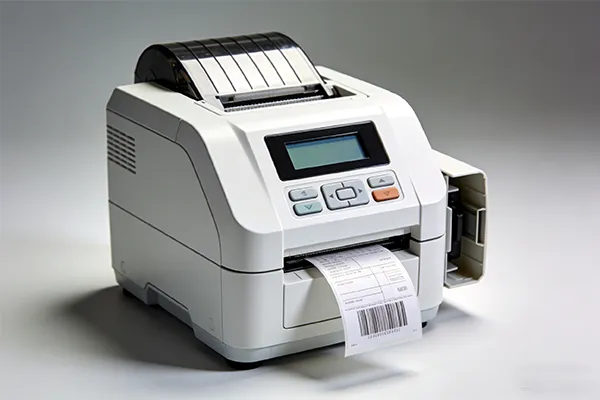
stampante
Stampante o etichettatrice: qual è la vera differenza per le esigenze aziendali?
Quale stampante di etichette acquistare per stampare etichette per spedizioni e magazzino?
Termica diretta o trasferimento termico: quale stampante per etichette termiche è più adatta ai vostri obiettivi di durata?
Avete bisogno di stampanti di etichette a colori per le etichette dei prodotti o è sufficiente il bianco e nero?
Stampante per etichette da tavolo e stampante portatile: qual è la soluzione più semplice per il vostro team?
Brother P-touch vs Dymo vs Niimbot: quale etichettatrice è la migliore per il lavoro quotidiano?
Opzioni di etichettatura wireless, Bluetooth e connesse: quale connettività è importante?
Caratteri, modelli e nastri di etichette: cosa influisce sulla qualità e sulla velocità di stampa?
Fogli di etichette con una stampante laser: quando ha ancora senso?
Lista di controllo per l'acquisto + case study + FAQ: scegliere la macchina etichettatrice giusta
Ecco come lo spiego agli acquirenti B2B: un'etichettatrice è uno strumento veloce per la creazione di etichette su richiesta, spesso con nastri di etichette, opzioni di modelli integrati e controlli semplici. Una stampante di etichette è costruita per i flussi di lavoro di produzione: etichette per la spedizione, etichette con codici a barre e stampa di etichette ad alta produttività.
Se il vostro team stampa 10-50 etichette al giorno per cestini, scaffali e cavi, un'etichettatrice sembra una magia. Se si stampano centinaia di etichette 4×6 per le spedizioni, è preferibile una stampante termica dedicata (un tipo di stampante per etichette) perché è veloce e richiede poca manutenzione. Molte aziende lo scoprono a fatica dopo aver tentato di eseguire lavori di etichettatura con una normale stampante da ufficio.
In qualità di produttori professionali di macchine automatiche per il confezionamento, consideriamo le etichette come parte del sistema di confezionamento, non come un gadget a sé stante. Quando le etichette funzionano, la velocità di confezionamento aumenta, gli errori di scansione diminuiscono e la linea diventa più efficiente.
Se il vostro obiettivo è quello di stampare etichette per le spedizioni, i resi e l'inventario, iniziate con una stampante termica per etichette. La stampa non richiede l'uso di inchiostro o toner, per cui i materiali di consumo rimangono semplici. La stampa termica è molto utilizzata anche per i codici a barre, perché produce risultati nitidi e facili da scansionare.
Una pratica configurazione "iniziale" per molti magazzini:
Una stampante termica da tavolo per etichette 4×6 per la spedizione
Una seconda unità per il backup (i tempi di inattività costano più di quanto si pensi)
Un flusso di lavoro di base per la progettazione di etichette con modelli salvati
Un buon esempio del mondo reale: una recente recensione di una stampante termica desktop mette in evidenza la velocità di stampa e un flusso di lavoro ricco di modelli, progettato per etichette di spedizione e codici a barre (e menziona il vantaggio della stampa senza inchiostro).
Quello che farei se gestissi la vostra linea di imballaggio: abbinare la stampante al lavoro sulle etichette. Etichette di spedizione? Termica. Marchio del prodotto? Colore. Etichette per beni di lunga durata? Trasferimento termico. Raramente una sola stampante si aggiudica tutti i lavori.
È qui che molti acquirenti sbagliano scelta. Entrambi sono "termici", ma si comportano in modo diverso:
La stampa termica diretta utilizza carta sensibile al calore. È ideale per le etichette a breve termine, come quelle per le spedizioni e per la logistica temporanea.
La stampa a trasferimento termico utilizza un nastro ed è migliore per le etichette durevoli che devono durare più a lungo o affrontare condizioni più difficili.
Una chiara regola empirica proveniente da una fonte del settore: la stampa termica diretta è spesso consigliata per l'uso a breve termine (comunemente descritto come meno di sei mesi), mentre il trasferimento termico è migliore per etichette a lungo termine e per esposizioni più severe.
| Lavoro con l'etichetta | La scelta migliore | Perché |
|---|---|---|
| Etichette di spedizione 4×6 | Termico diretto | forniture rapide, a basso costo e semplici |
| Etichette per bidoni da magazzino (interno) | Trasferimento termico (o termico diretto) | il trasferimento dura più a lungo e resiste allo sbiadimento |
| Esposizione esterna/chimica | Trasferimento termico | migliore resistenza e lunga durata |
| Etichette brevi per gli eventi | Termico diretto | veloce e conveniente |
Se siete responsabili della logistica, del magazzino o della distribuzione, questa decisione da sola può ridurre drasticamente il lavoro di rietichettatura.
Se spedite cartoni e stampate codici a barre, il bianco e nero va bene. Ma se si vendono prodotti e si desidera un forte impatto sugli scaffali, il colore stampanti di etichette può essere un passo avanti intelligente.
Le etichette a colori vi aiutano:
differenziare velocemente gli SKU (meno errori di picking)
comunicare chiaramente avvertenze e istruzioni
sostenere la coerenza del marchio sulle etichette dei prodotti
Un buon punto di riferimento: La linea ColorWorks di Epson si posiziona come stampa di etichette commerciali a colori on-demand, e la pagina del prodotto CW-C4000 evidenzia la velocità (fino a 4″ al secondo) e la durata, con tanto di certificazione BS-5609.
La mia opinione personale: se le vostre etichette sono per lo più destinate alla logistica interna, evitate il colore e puntate sull'affidabilità. Se le etichette sono rivolte al cliente, il colore può ripagare con un minor numero di SKU di etichette prestampate e un migliore controllo del marchio.
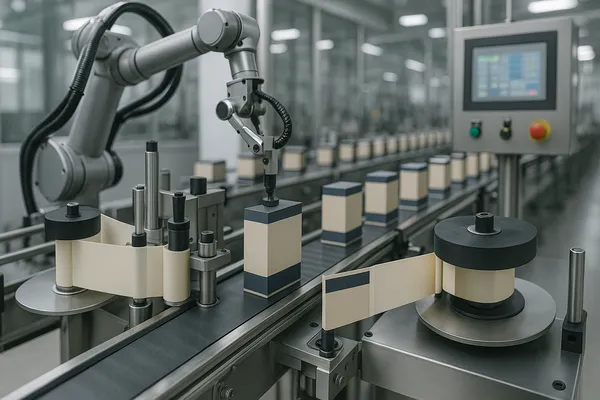
linea di assemblaggio delle etichettatrici
This is not about “better.” It’s about who prints labels and where.
Choose a desktop label printer if you:
print high volumes
need consistent print quality
use a packing station workflow
want fast, repeatable create and print processes
Choose a handheld label maker if you:
label items on the move (maintenance, warehouse aisles)
need quick edits with a qwerty keyboard
want fast bin and cable labeling without a computer
The sweet spot in many operations is both:
One desktop unit at shipping
One handheld label maker for maintenance and floor labeling
That combo keeps output fast and avoids the “walk back to the office printer” problem.
You asked “what machine,” so let’s talk about popular families without pretending one brand is perfect for everyone.
Brother P-touch (including Brother P-touch CUBE)
Brother supports multiple label maker models and software options, including its iPrint&Label ecosystem and compatible devices (like PT series and QL label printers).
For contractors and facility teams, Brother also has industrial-focused lines like P-touch EDGE with multiple label sizes and connectivity options.
Dymo is widely used for office/admin labels and quick organizational use cases. It’s popular in small businesses that want simple labeling without a learning curve.
If your team wants a phone-first workflow, niimbot and phomemo style tools are often used as portable label options. They can be handy for light-duty use and quick labeling in the field.
A 2025 roundup that interviewed professional organizers favored Brother P-touch models (including a CUBE option) for portability and Bluetooth ease of use—useful as a signal that smartphone-driven labeling is now mainstream.
Practical advice: pick the label maker that matches your label materials and your daily habits. The “best label maker” is the one your team will actually use.
Connectivity is not a luxury anymore. It directly affects speed and errors.
Here’s what matters most:
Bluetooth for quick phone-to-printer labeling on the floor
Wireless networking for shared use at stations
Driver and software stability for long-term operations
Brother highlights broad support for app-based labeling and multiple models that pair with mobile workflows.
For industrial labeling, Bluetooth and USB-C connectivity options are also emphasized in some P-touch industrial lines.
My rule: if more than one person prints labels, network support matters. If one person prints labels at one station, simple USB is fine.
People often focus on the device and ignore the workflow. But the real “productivity engine” is:
your template library
your font consistency
your label layout rules
If your labels include a barcode, use a consistent format and confirm scan reliability. Keep quiet zones. Avoid squeezing text too small. And create a few standardized templates:
address labels
shipping labels
bin/location codes
safety/warning labels
For tape-based label makers, label tapes matter as much as the printer. The right tape improves adhesion and durability. The wrong tape wastes time and money (labels peel, then workers reprint).
If you want to print high-quality labels every day, standardize your templates and train operators for one-touch workflows. The goal is fewer decisions, fewer mistakes, and faster output.
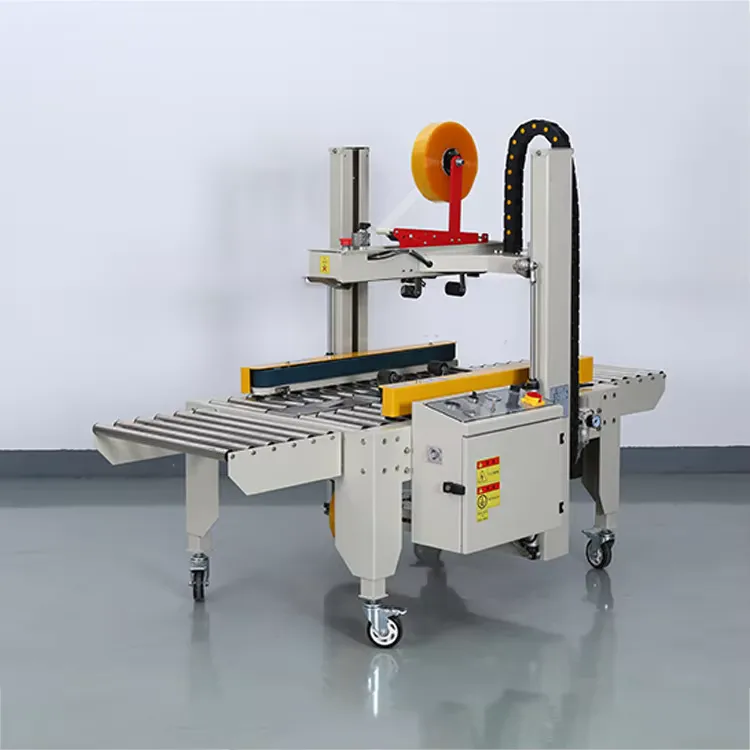
Macchina automatica per la sigillatura e l'etichettatura dei cartoni casuali
Yes, a laser printer with label sheets can still work—especially in offices printing low-volume address labels, asset stickers, or document-based labeling.
But for operational labeling (shipping + barcode + high volume), many businesses move to dedicated label printing because thermal systems are faster and built for labels.
| Necessità | Best option |
|---|---|
| occasional office labels | laser printer + label sheets |
| daily shipping labels | stampante termica per etichette |
| durable industrial labels | thermal transfer label printer |
| branded color product labels | color label printers |
If you’re scaling e-commerce, warehousing, or distribution, specialized label printing is usually the clean upgrade.
Before you purchase, align on five things:
1) Your label job
shipping labels (4×6)
barcode labels (inventory)
product labels (customer-facing)
safety and compliance labels
2) Your label materials
paper labels vs synthetic
heat / moisture exposure
adhesion needs
3) Your workflow
who prints labels?
how many stations?
do you need bluetooth connectivity and phone workflows?
4) Your compliance needs
Many B2B buyers ask for certified equipment and traceable printing workflows. If labels support regulated packaging, build your label control process early.
5) Your growth curve
Today you print 200 labels/day. Next quarter it’s 2,000. Buy with that in mind.
Customer type: e-commerce fulfillment + small warehouse
Problem: slow packing line, relabeling, inconsistent address labels
Old setup: office printer + label sheets + manual cutting
New setup: desktop thermal stampante di etichette for 4×6, plus a handheld label maker for bins and returns
Outcome: packing speed improved because label printing became one-touch; misprints dropped due to templates; bin labels stayed readable longer thanks to better materials and placement. (This is exactly the kind of improvement we aim for as an automatic packaging machine manufacturer—packaging works best as a system.)
What machine do you need to print labels for shipping?
A thermal label printer is the most common choice for shipping labels because it prints fast without ink or toner.
Is a label maker the same as a label printer?
Not exactly. A label maker is usually optimized for quick, small-format labeling (often tape-based). A label printer is typically built for higher volume label printing, including shipping and barcode labels.
What’s the difference between direct thermal printing and thermal transfer?
Direct thermal uses heat-sensitive media; thermal transfer uses a ribbon and is usually better for durable, long-life labels.
Do I need color label printers for my business?
If your labels are customer-facing or brand-critical, color can help. For pure logistics and barcodes, black-and-white thermal is usually enough. Epson highlights on-demand commercial color label printing use cases in its ColorWorks line.
Can I print labels with a laser printer and label sheets?
Yes for low volume office use. For warehouse and shipping speed, specialized label printers are often faster and more efficient for labels.
What should I look for in the best label maker to organize a warehouse?
Look for durable materials, strong adhesives, easy-to-use templates, and connectivity (Bluetooth or network) that fits your workflow.
Choose a label maker for quick, flexible labeling; choose a label printer for high-volume operations.
For shipping, a thermal label printer is often the fastest, simplest option.
Direct thermal fits short-term labels; thermal transfer fits durable, long-life labels.
Consider color label printers for branded product labels and on-demand color.
Templates, fonts, and connectivity decisions matter as much as hardware.
If you tell me your label sizes, daily volume, and materials, I can recommend a setup that fits your packaging line and keeps output efficient.

 Italiano
  English
  Français
  Deutsch (Sie)
  Русский
  Español
  Português
  العربية