Tel./WhatsApp:
+86 15266206885
E-mail:
[email protected]


Avoid your inquiry is delay response, please enter your WhatsApp/Skype along with the message, so we can contact you at the very first time.
We will reply you within 24 hours. If for urgent case, please add WhatsApp/WeChat: ,. Or call directly.
When labels smudge, peel, or scan poorly, the whole line slows down. Returns rise. Workers reprint the same thing again and again. That “small” label problem quickly turns into a big productivity problem. The fix is simple: choose the right label maker or label printer for your workflow and materials.
To print labels, you typically need a label printer (thermal or inkjet) for high-volume shipping and barcode labels, or a label maker for quick in-house organization and cable/asset labeling. Direct thermal is best for short-life shipping labels, thermal transfer is better for durable labels, and color label printers are ideal for branded product labels.
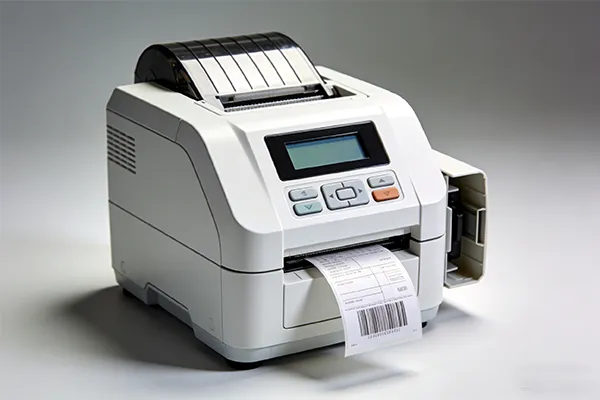
printer
Printer or label maker: what’s the real difference for business needs?
What label printer should you buy to print labels for shipping and warehouse use?
Direct thermal vs thermal transfer: which thermal label printer fits your durability goals?
Do you need color label printers for product labels—or is black-and-white enough?
Desktop label printer vs handheld label maker: which is easier for your team?
Brother P-touch vs Dymo vs Niimbot: which label maker is best for daily work?
Wireless, Bluetooth, and connected label maker options: what connectivity matters?
Fonts, templates, and label tapes: what affects print quality and speed?
Label sheets with a laser printer: when does that still make sense?
Buying checklist + case study + FAQs: choose the right label maker machine
Here’s the clean way I explain it to B2B buyers: a label maker is a fast tool for making labels on demand—often with label tapes, built-in template options, and simple controls. A label printer is built for production workflows—shipping labels, barcode labels, and high-throughput label printing.
If your team prints 10–50 labels a day for bins, shelves, and cables, a label maker feels like magic. If you print hundreds of 4×6 shipping labels, you want a dedicated thermal printer (a type of label printer) because it’s fast and low maintenance. Many businesses discover this the hard way after trying to run label jobs through a general office printer.
As a professional manufacturer of automatic packaging machines, we see labels as part of the packaging system, not a standalone gadget. When labels work, your packing speed goes up, scan errors go down, and your line becomes more efficient.
If your goal is to print labels for shipping, returns, and inventory, start with a thermal label printer. It prints without ink or toner, which keeps consumables simple. Thermal printing is also widely used for barcodes because it produces crisp, scan-friendly output.
A practical “starter” setup for many warehouses:
A desktop 4×6 thermal label printer for shipping
A second unit for backup (downtime costs more than you think)
A basic label design workflow with saved templates
A good real-world example: a recent review of a desktop thermal printer highlights fast printing and a template-rich app workflow, designed for shipping labels and barcodes (and it mentions the benefit of inkless printing).
What I’d do if I ran your packing line: match the printer to the label job. Shipping labels? Thermal. Product branding? Color. Long-life asset tags? Thermal transfer. One printer rarely wins every job.
This is where many buyers make the wrong call. Both are “thermal,” but they behave differently:
Direct thermal printing uses heat-sensitive paper. It’s great for short-term labels like shipping and temporary logistics tags.
Thermal transfer printing uses a ribbon, and it’s better for durable labels that need to last longer or handle tougher conditions.
One clear rule of thumb from an industry source: direct thermal is often recommended for short-term use (commonly described as less than six months), while thermal transfer is better for longer-term labels and harsher exposure.
| Label job | Best choice | Why |
|---|---|---|
| 4×6 shipping labels | Direct thermal | fast, low cost, easy supplies |
| Warehouse bin labels (indoor) | Thermal transfer (or direct thermal) | transfer lasts longer and resists fading |
| Outdoor / chemical exposure | Thermal transfer | better resistance and long service life |
| Short event labels | Direct thermal | quick and convenient |
If you’re a logistics, warehousing, or distribution buyer, this decision alone can cut relabeling work dramatically.
If you ship cartons and print barcodes, black-and-white is fine. But if you sell products and want strong shelf impact, color label printers can be a smart step up.
Color labels help you:
differentiate SKUs fast (less picking error)
communicate warnings and instructions clearly
support brand consistency on product labels
A good reference point: Epson’s ColorWorks line is positioned as on-demand commercial color label printing, and the CW-C4000 product page highlights speed (up to 4″ per second) and durability claims including BS-5609 certification mention.
My honest take: if your labels are mostly internal logistics, skip color and put budget into reliability. If your label is customer-facing, color can pay back through fewer preprinted label SKUs and better branding control.
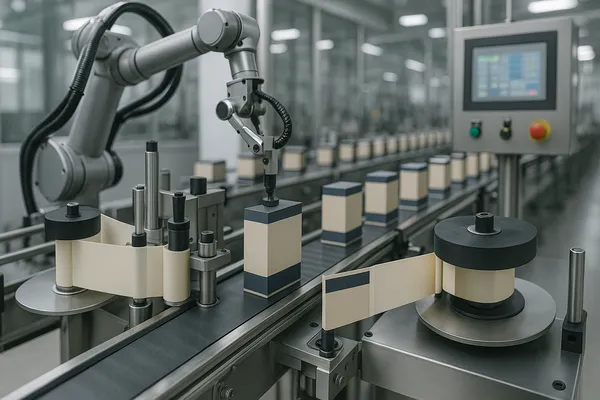
labeling machine assembly line
This is not about “better.” It’s about who prints labels and where.
Choose a desktop label printer if you:
print high volumes
need consistent print quality
use a packing station workflow
want fast, repeatable create and print processes
Choose a handheld label maker if you:
label items on the move (maintenance, warehouse aisles)
need quick edits with a qwerty keyboard
want fast bin and cable labeling without a computer
The sweet spot in many operations is both:
One desktop unit at shipping
One handheld label maker for maintenance and floor labeling
That combo keeps output fast and avoids the “walk back to the office printer” problem.
You asked “what machine,” so let’s talk about popular families without pretending one brand is perfect for everyone.
Brother P-touch (including Brother P-touch CUBE)
Brother supports multiple label maker models and software options, including its iPrint&Label ecosystem and compatible devices (like PT series and QL label printers).
For contractors and facility teams, Brother also has industrial-focused lines like P-touch EDGE with multiple label sizes and connectivity options.
Dymo is widely used for office/admin labels and quick organizational use cases. It’s popular in small businesses that want simple labeling without a learning curve.
If your team wants a phone-first workflow, niimbot and phomemo style tools are often used as portable label options. They can be handy for light-duty use and quick labeling in the field.
A 2025 roundup that interviewed professional organizers favored Brother P-touch models (including a CUBE option) for portability and Bluetooth ease of use—useful as a signal that smartphone-driven labeling is now mainstream.
Practical advice: pick the label maker that matches your label materials and your daily habits. The “best label maker” is the one your team will actually use.
Connectivity is not a luxury anymore. It directly affects speed and errors.
Here’s what matters most:
Bluetooth for quick phone-to-printer labeling on the floor
Wireless networking for shared use at stations
Driver and software stability for long-term operations
Brother highlights broad support for app-based labeling and multiple models that pair with mobile workflows.
For industrial labeling, Bluetooth and USB-C connectivity options are also emphasized in some P-touch industrial lines.
My rule: if more than one person prints labels, network support matters. If one person prints labels at one station, simple USB is fine.
People often focus on the device and ignore the workflow. But the real “productivity engine” is:
your template library
your font consistency
your label layout rules
If your labels include a barcode, use a consistent format and confirm scan reliability. Keep quiet zones. Avoid squeezing text too small. And create a few standardized templates:
address labels
shipping labels
bin/location codes
safety/warning labels
For tape-based label makers, label tapes matter as much as the printer. The right tape improves adhesion and durability. The wrong tape wastes time and money (labels peel, then workers reprint).
If you want to print high-quality labels every day, standardize your templates and train operators for one-touch workflows. The goal is fewer decisions, fewer mistakes, and faster output.
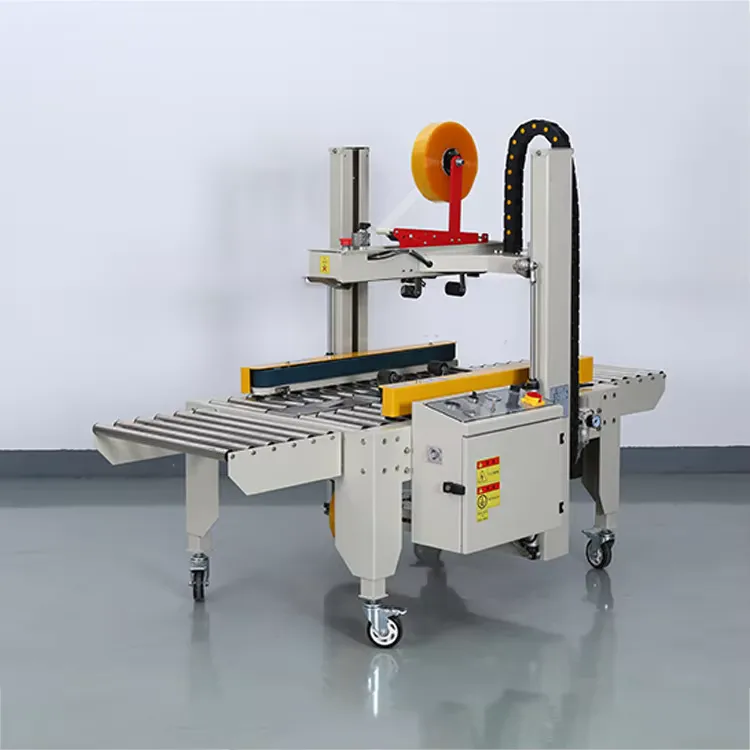
Automatic random carton sealing and labeling machine
Yes, a laser printer with label sheets can still work—especially in offices printing low-volume address labels, asset stickers, or document-based labeling.
But for operational labeling (shipping + barcode + high volume), many businesses move to dedicated label printing because thermal systems are faster and built for labels.
| Need | Best option |
|---|---|
| occasional office labels | laser printer + label sheets |
| daily shipping labels | thermal label printer |
| durable industrial labels | thermal transfer label printer |
| branded color product labels | color label printers |
If you’re scaling e-commerce, warehousing, or distribution, specialized label printing is usually the clean upgrade.
Before you purchase, align on five things:
1) Your label job
shipping labels (4×6)
barcode labels (inventory)
product labels (customer-facing)
safety and compliance labels
2) Your label materials
paper labels vs synthetic
heat / moisture exposure
adhesion needs
3) Your workflow
who prints labels?
how many stations?
do you need bluetooth connectivity and phone workflows?
4) Your compliance needs
Many B2B buyers ask for certified equipment and traceable printing workflows. If labels support regulated packaging, build your label control process early.
5) Your growth curve
Today you print 200 labels/day. Next quarter it’s 2,000. Buy with that in mind.
Customer type: e-commerce fulfillment + small warehouse
Problem: slow packing line, relabeling, inconsistent address labels
Old setup: office printer + label sheets + manual cutting
New setup: desktop thermal label printer for 4×6, plus a handheld label maker for bins and returns
Outcome: packing speed improved because label printing became one-touch; misprints dropped due to templates; bin labels stayed readable longer thanks to better materials and placement. (This is exactly the kind of improvement we aim for as an automatic packaging machine manufacturer—packaging works best as a system.)
What machine do you need to print labels for shipping?
A thermal label printer is the most common choice for shipping labels because it prints fast without ink or toner.
Is a label maker the same as a label printer?
Not exactly. A label maker is usually optimized for quick, small-format labeling (often tape-based). A label printer is typically built for higher volume label printing, including shipping and barcode labels.
What’s the difference between direct thermal printing and thermal transfer?
Direct thermal uses heat-sensitive media; thermal transfer uses a ribbon and is usually better for durable, long-life labels.
Do I need color label printers for my business?
If your labels are customer-facing or brand-critical, color can help. For pure logistics and barcodes, black-and-white thermal is usually enough. Epson highlights on-demand commercial color label printing use cases in its ColorWorks line.
Can I print labels with a laser printer and label sheets?
Yes for low volume office use. For warehouse and shipping speed, specialized label printers are often faster and more efficient for labels.
What should I look for in the best label maker to organize a warehouse?
Look for durable materials, strong adhesives, easy-to-use templates, and connectivity (Bluetooth or network) that fits your workflow.
Choose a label maker for quick, flexible labeling; choose a label printer for high-volume operations.
For shipping, a thermal label printer is often the fastest, simplest option.
Direct thermal fits short-term labels; thermal transfer fits durable, long-life labels.
Consider color label printers for branded product labels and on-demand color.
Templates, fonts, and connectivity decisions matter as much as hardware.
If you tell me your label sizes, daily volume, and materials, I can recommend a setup that fits your packaging line and keeps output efficient.

 English
  Français
  Deutsch (Sie)
  Русский
  Español
  Italiano
  Português
  العربية